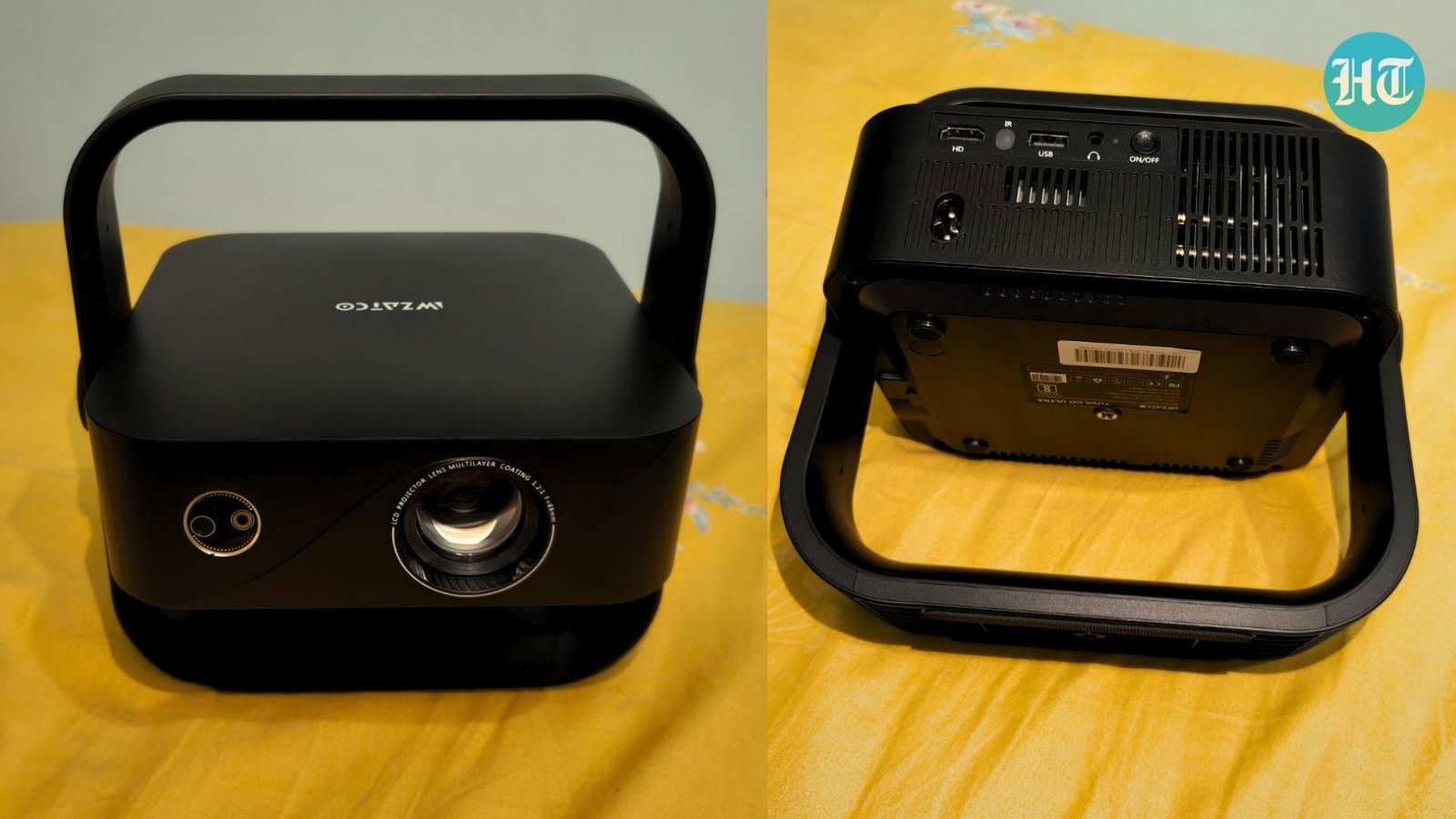
The Wzatco Yuva Go Ultra promises a big-screen experience with Google TV and smart automation. I tested it for movies, shows and everyday streaming to find out.


Research-Backed Choices
Wzatco Yuva Go Ultra projector review: A few years ago, buying a projector under Rs. 20,000 usually meant accepting compromises. The content looked soft, streaming apps felt unreliable, brightness claims rarely matched reality, and setting up the projector often became a task of its own. I've reviewed enough budget projectors to know that the gap between a spec sheet and a lit-up wall can be brutal. So when I got the Wzatco Yuva Go Ultra for review, I didn't expect much. On paper, it offers almost everything a first-time projector buyer could ask for - native Full HD resolution, Google TV, Wi-Fi 6, auto-focus, auto keystone correction and a sealed optical engine. The specifications certainly look impressive for the price.

But specifications do not watch movies.
To find out whether the Yuva Go Ultra projector can actually replace a television for everyday entertainment, I spent over a couple of weeks using it as my primary screen. From late-night episodes of House of the Dragon Season 3 to action-heavy sequences in Tom Clancy's Jack Ryan: Ghost War and more, the goal was simple: see whether this projector delivers a cinema-like experience or merely a bigger picture. So without further ado, let's take a look at this detailed review, which might help you decide whether you need a portable projector or buying a TV would be the smart choice.
First Impressions: Smaller Than I Expected

I'll admit the size threw me a little. At just over a kilo, the Yuva Go Ultra is light enough to carry from the living room to the bedroom in one hand, which is exactly what I ended up doing more than once during testing. It sits flat on a coffee table without looking like an appliance, helped along by a clean matte body and a tilt bracket that lets you angle it upward without propping it on a stack of books, something I've had to do with cheaper projectors in the past.
The top panel has physical buttons for when the remote goes missing under a cushion, and the remote itself is better thought out than I expected at this price - Google TV shortcuts, a mic button for voice search, and the kind of layout that doesn't need a manual. One HDMI port and one USB port cover the basics; if you're someone who wants a soundbar, a streaming stick, and a gaming console all connected permanently, you'll want an HDMI switcher in the mix, because there's only the one port to work with.
The bit I found genuinely reassuring is the sealed optical engine. Most projectors in this segment use open lens housings that let dust drift in over months of use, slowly dulling the picture. Wzatco's sealed unit is built to avoid that altogether, and the brand's claimed lamp life of 30,000 hours is the kind of number that, if accurate, means this projector should outlast several phone upgrade cycles before the lamp becomes a concern.
Setting It Up: This Is Where It Won Me Over

I didn't bother measuring distances or angles before switching it on for the first time, mostly out of habit from testing projectors that punish you for not doing so. I just placed it on the table at a slight angle to the wall and turned it on. Within seconds, Auto Focus, Auto Keystone Correction, and Auto Obstacle Avoidance kicked in, and the image squared itself out and sharpened without me touching a single setting.
This sounds like a small thing until you've fought with a projector that needs ten minutes of trapezoidal correction every time you move it an inch. Here, I shifted the projector between three different spots in my living room over the week - coffee table, side console, even balanced briefly on a stool for a better throw distance, and every single time, it corrected itself before I'd even picked up the remote.
Watching Things on It: The Real Test
The Wzatco Yuva Go Ultra projector uses a native Full HD (1920 x 1080) resolution panel, and that immediately puts it ahead of many entry-level projectors that rely on lower-resolution hardware. I tested the projector across screen sizes ranging from roughly 75 inches to 130 inches. Around the 100-inch mark felt like the sweet spot, balancing brightness and image sharpness.
Numbers on a spec sheet only mean so much, so I ran it the way I'd actually use a projector with the lights down and a real watchlist, not a calibration disc.

I started with Tom Clancy's Jack Ryan: Ghost War, which leans on dim, shadow-heavy interrogation scenes and night-vision sequences that tend to expose weak contrast immediately. The Yuva Go Ultra's quoted 7000:1 contrast ratio isn't going to compete with an OLED panel, and the blacks lean more toward a deep charcoal than true black. But in a properly darkened room, the separation between shadow and subject held up well enough that I wasn't squinting to figure out what was happening on screen, which is more than I can say for some projectors twice this price.

Dacoit: A Love Story gave me a better sense of how the projector handles colour. The film leans into warm, dusty tones; ochres, sun-baked browns, the occasional burst of red, and the Yuva Go Ultra reproduced them with a richness that felt closer to a calibrated TV than I expected from an LED light source at this price. Skin tones stayed natural rather than oversaturated, which is a trap a lot of budget projectors fall into when they try to compensate for lower brightness with punchier colour processing.

For something lighter, I put on Young Sherlock on Amazon Prime over a weekend afternoon with the curtains drawn but not blacked out. This is where the brightness claim actually gets interesting - in indirect daylight, the image held its own far longer than I expected before starting to wash out. Open the curtains fully, though, and like virtually every LED projector in this bracket, the picture loses punch fast. This is a projector that wants its evenings.
The real stress test came with House of the Dragon Season 3. Dragon-fire sequences and wide aerial shots of Westeros are demanding on motion handling, and I was curious to see how the panel's MEMC (motion smoothing) would cope with fast camera pans during the battle scenes. It did reasonably well; there was a touch of judder during the quickest pans, but nothing that pulled me out of the scene, and skin and fire tones stayed consistent through scene transitions without the colour shift I've seen on cheaper panels.
I closed out the weekend with Dhurandhar: The Revenge on JioHotstar, mostly because I wanted to end on something loud and fast-paced rather than moody and cinematic. Action sequences with rapid cuts are usually where motion smoothing either saves a projector or exposes it, and here it mostly saved it. There was the occasional soft frame during the fastest sequences, but for a Sunday-night watch with a bowl of popcorn balanced on my knee, I wasn't nitpicking.
Audio: Good Enough, But Upgrade If You Can
The built-in 5W speaker is the one area where I'd set expectations early. It's loud enough to fill a medium room and clear enough for dialogue, but the bass is thin, and there's a ceiling to how immersive it can feel during anything with a real score - House of the Dragon's soundtrack in particular felt flattened through the onboard speaker. I paired a Bluetooth soundbar via Bluetooth 5.0 partway through the week, and the difference was immediate. If you're building anything resembling a home cinema setup around this, budget for external audio from the start rather than treating it as an afterthought.
Software and Everyday Use

Many affordable projectors still struggle with software. Menus can feel outdated, apps crash, and navigation becomes frustrating.
That is not the case here.
The inclusion of Google TV running on Android 14 significantly improves the experience. Netflix, Prime Video, YouTube and other popular streaming apps are easily accessible through a familiar interface. Wi-Fi 6 support helps maintain stable streaming performance. Throughout testing, 1080p content loaded consistently without buffering issues.
The auto-focus and auto-keystone systems deserve special mention. Every time I moved the projector, it automatically corrected image alignment within seconds. Auto obstacle avoidance also worked reliably when objects partially blocked the projection area. These may sound like small conveniences, but they make everyday usage far easier.
However, the Yuva Go Ultra isn't perfect. The 1GB RAM and 8GB storage configuration is where the budget nature of the device shows through. Heavier apps take a beat longer to open than I'd like, and there isn't much room for downloads if you're someone who likes to have content saved locally. The single HDMI port may also be restrictive for users planning to connect multiple devices simultaneously. Neither issue is a deal-breaker, but they are worth keeping in mind.
Verdict: Should You Buy It?
The Wzatco Yuva Go Ultra is a projector that understands its role. It doesn't chase premium home theatre territory, nor does it rely solely on a long list of features to make its case. Instead, it delivers where it matters most: a sharp Full HD picture, a straightforward smart TV experience and a setup process that feels effortless.
If you're expecting TV's like brightness, deep OLED-like blacks or flagship-level hardware, this projector will remind you fairly quickly that it costs under Rs. 20,000. The limited RAM occasionally slows down app loading, the built-in speaker is best described as functional, and daytime viewing remains a compromise unless you have good light control.
The Wzatco Yuva Go Ultra projector is not the best projector money can buy, nor is it trying to be. But for first-time projector buyers, students, renters or anyone looking to build an affordable home cinema setup, it offers a reasonable balance of features, performance, and convenience. In a market crowded with products that promise more than they deliver, the Yuva Go Ultra largely delivers what it promises.
Check out these projectors from Wzatco:
Specifications
Reasons to buy

Reliable auto-focus and keystone correction
Google TV with Android 14
Good contrast and colour performance
Reason to avoid

Best used in controlled lighting conditions rather than bright daylight environments.